Take your medicine on time, with zero stress.
A free medication tracker for you and your family. Organize local dose records, set optional reminders, and see in-app warnings when recorded stock is low. Reminder delivery depends on your phone’s permissions and system settings.
Experience How Simple Daily Tracking Feels
Test the daily routine below! Switch family profiles, record an afternoon dose, and hear the soothing reminder chime.
Great job! You only have 1 dose remaining for today.
Everything you need. Nothing complicated.
DoseTracker brings medicine schedules, recorded doses, and stock warnings together in one place.
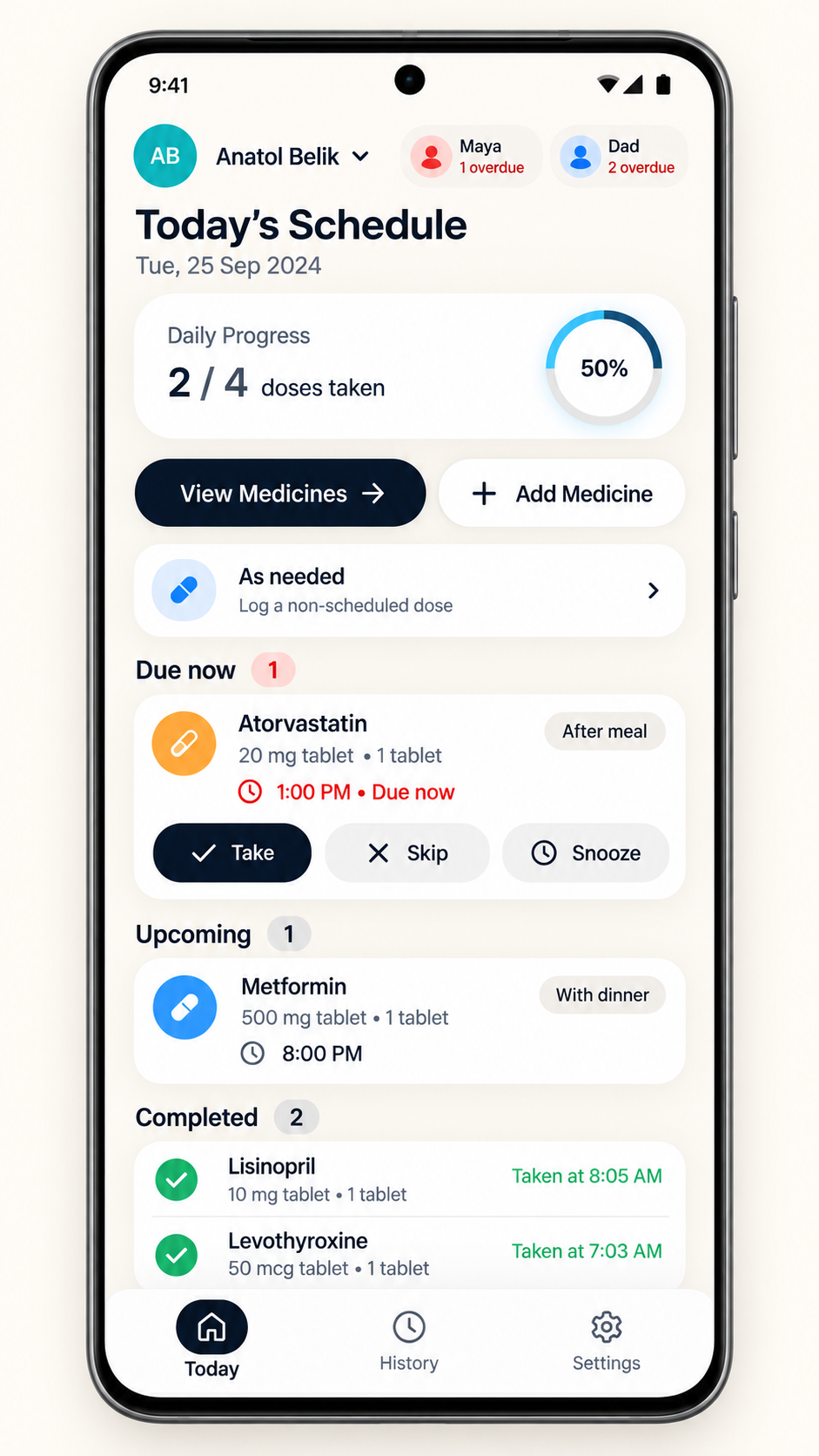
Clear Today Schedule
See what needs to be taken grouped clearly by Morning, Afternoon, Evening, and Bedtime. Simple one-tap buttons let you record or snooze in a second.
Optional Local Reminders
Set reminders for ongoing daily or weekday schedules starting today. Android permissions, battery restrictions, and notification settings can delay or prevent delivery. Interval and bounded-course schedules currently support tracking only.
Stock Counts & In-App Warnings
Recording a taken dose reduces the stock you entered. An in-app warning appears at or below your chosen threshold. Keep counts and refills up to date; background refill notifications are not provided.
Family Caregiver Profiles
Keep your parents, kids, or pets organized with separate color-coded profiles. The switcher alerts you immediately if someone has an overdue dose.
History Calendar
Review the doses you recorded in the history calendar. Records reflect your entries and do not verify whether medicine was taken.
Fingerprint & Privacy Guard
Lock the app with your fingerprint or face recognition. You can also hide medicine names on your lock screen so passersby cannot read your prescriptions.
See the App in Action
These images are design previews, not verified screenshots of the release build. Actual screens and available features may differ.
Today Schedule & Daily Checklist
Your daily routine laid out clearly. Cards show the dose and instructions you entered, with controls to record or snooze. Check these details against your prescription.
Add a Medicine Step by Step
A step-by-step assistant guides you through name, schedule, and stock warnings without confusing medical menus.
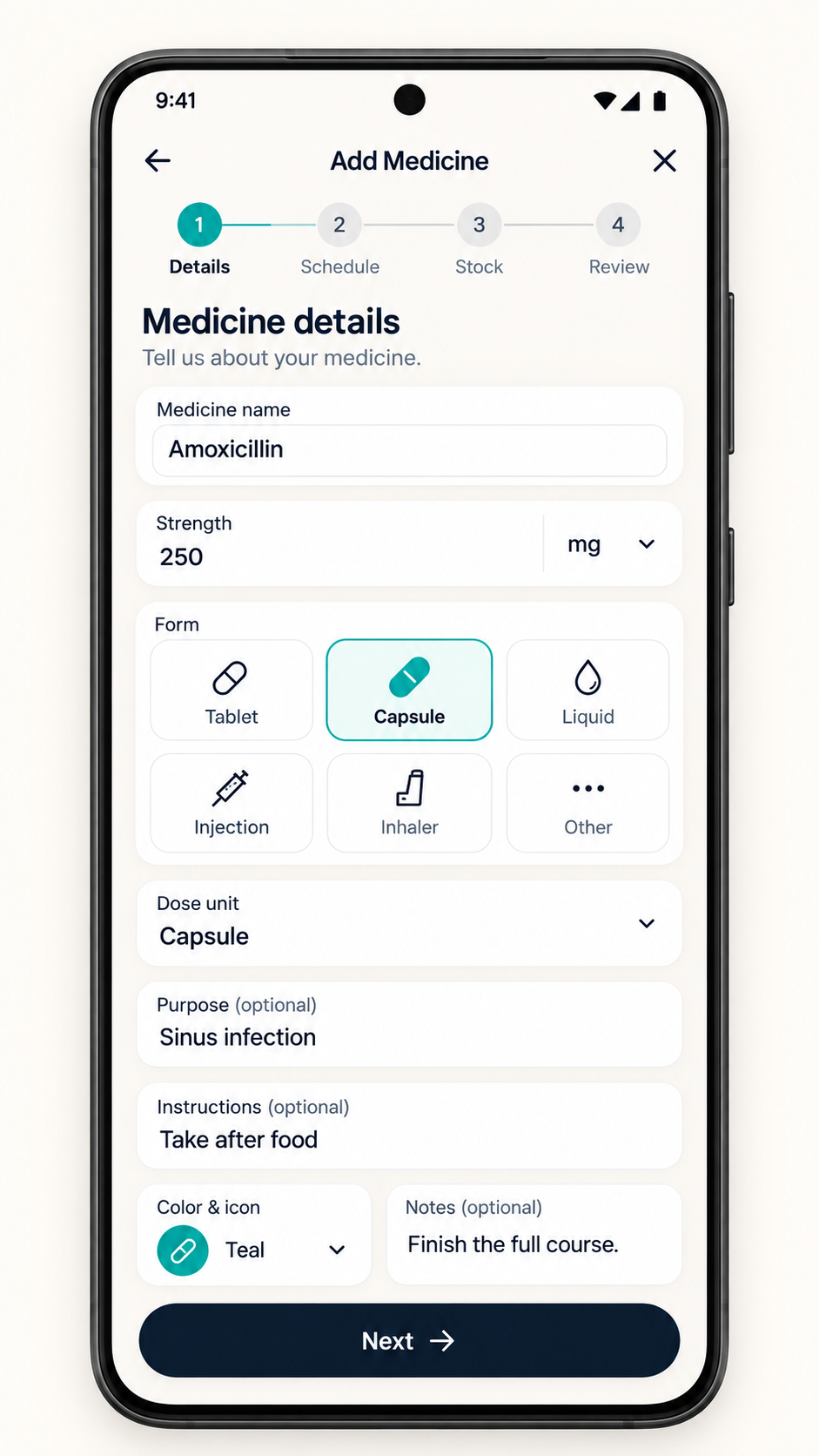
Name & Strength
Type the medicine name, strength, form (tablets, drops, syrup), and pick a cheerful color tag.
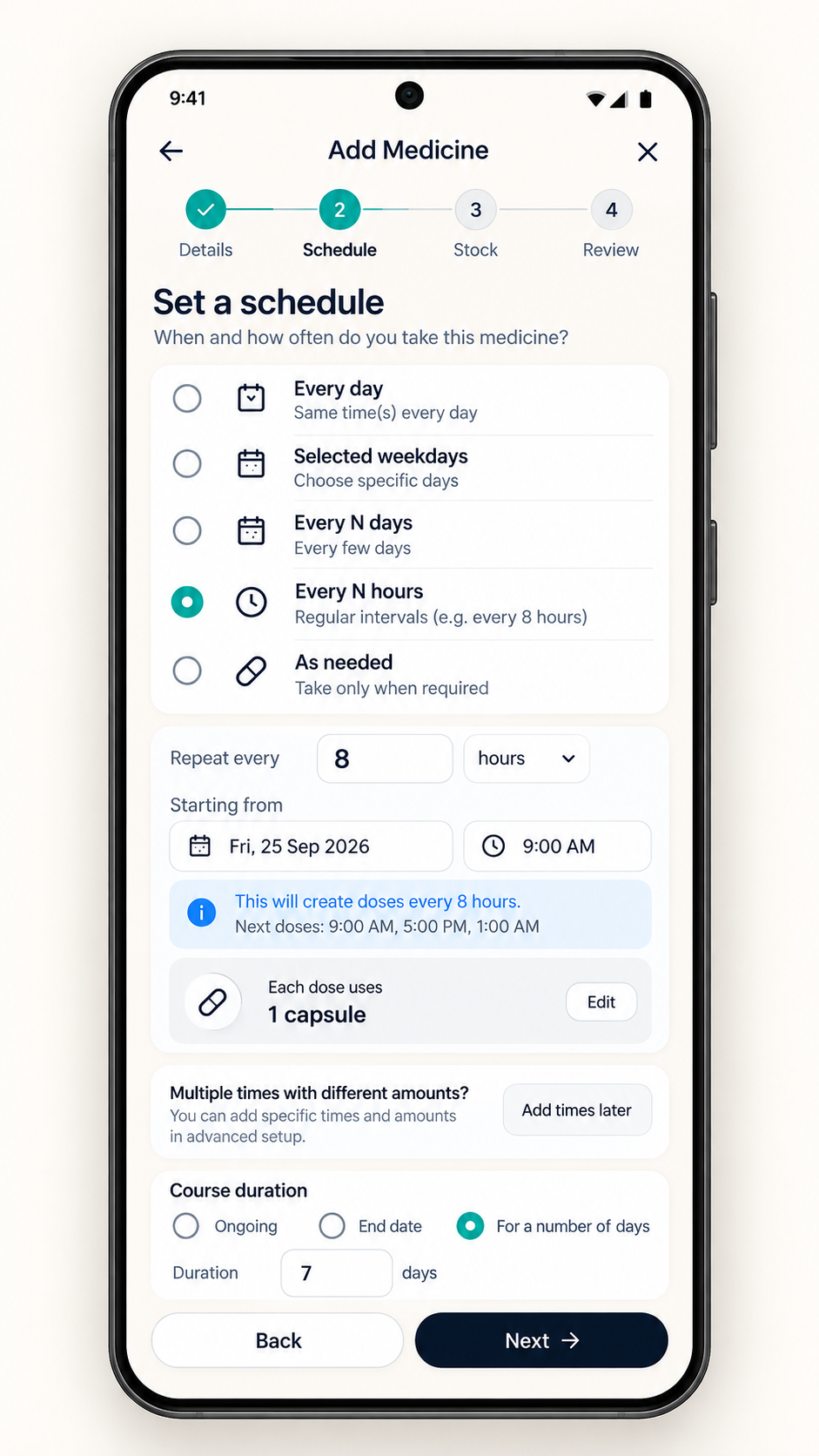
When to Take It
Track daily, weekday, interval, or as-needed schedules. Automatic reminders support ongoing daily or weekday schedules starting today; other patterns are tracking only.
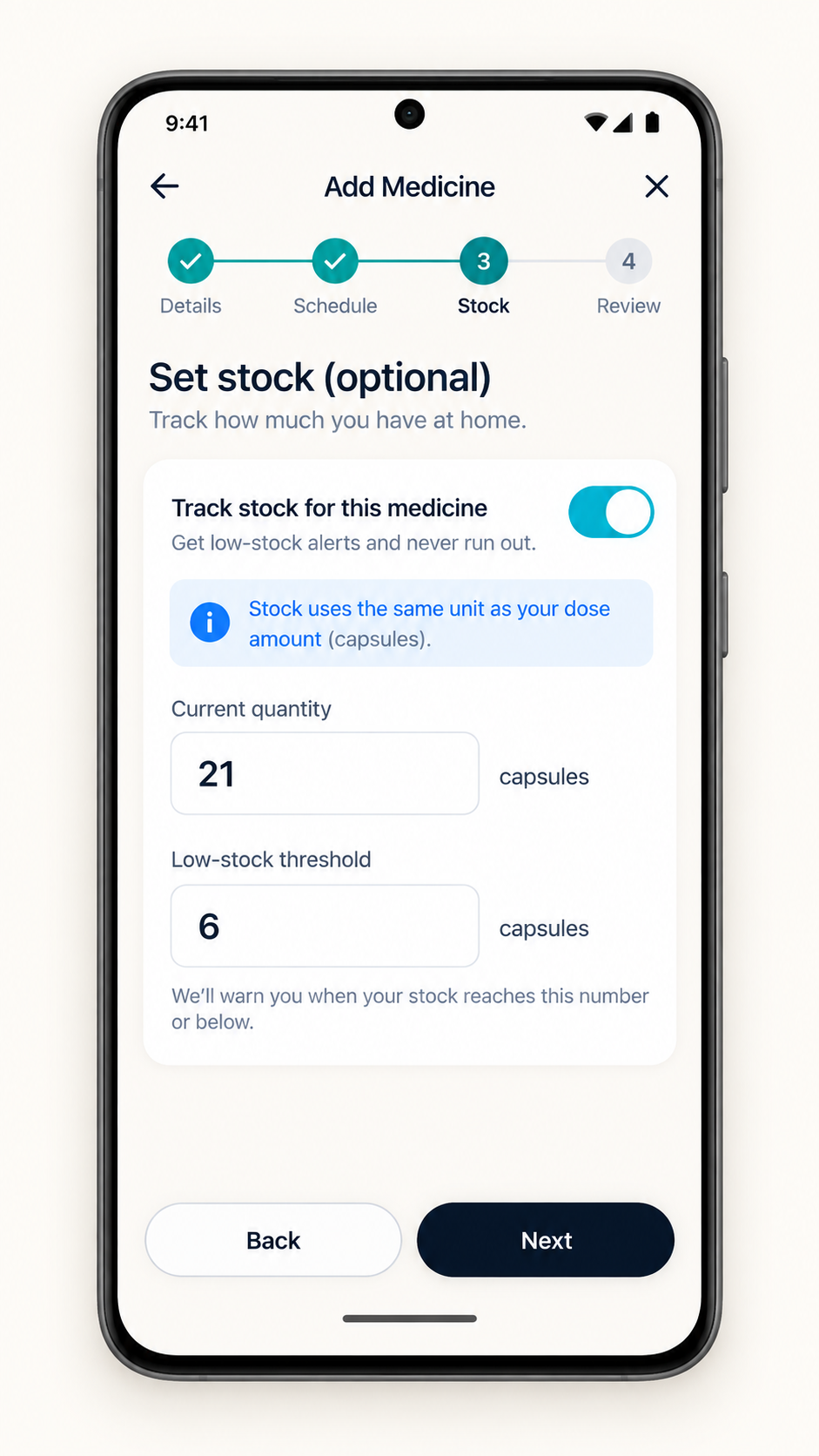
Supply & Refills
Enter your stock and warning threshold. Check in-app warnings and keep counts up to date.
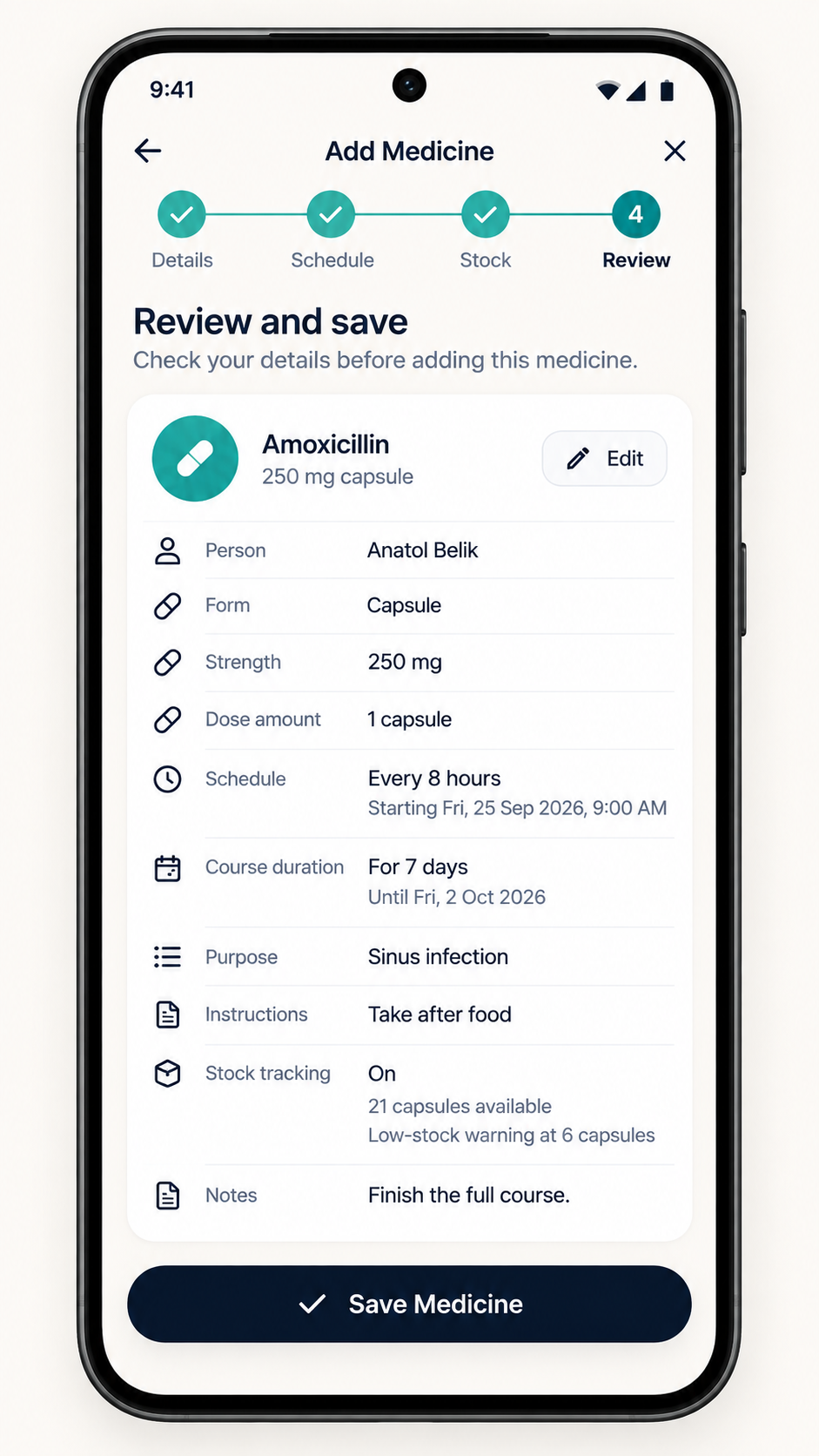
Review & Finish
Review and save. If you enabled reminders for a supported schedule, the app requests them through your device.
Pleasant Chimes Instead of Harsh Alarms
Loud medical sirens cause anxiety. DoseTracker includes custom acoustic chimes designed to catch your attention politely without startling you.
Gentle Harmony
A soft, soothing melody ideal for quiet offices, reading, or bedside evening reminders.
Clear Chime
A cheerful, crisp chime that easily cuts through ambient room noise, television, or outdoors.
Manage Your Information on Your Device
Review the controls and their limits before entering health information.
| Control | How it works |
|---|---|
| Local health records | Profiles, medicines, schedules, and history are stored in the app’s private device storage. No remote account or health-record sync is provided. |
| Device app lock | Optional fingerprint, face, or device screen-lock authentication protects app access. It does not encrypt the health database. Anyone with an enrolled credential may unlock it. |
| Notification privacy | Choose whether reminders show medicine details. Details are shown by default; your system settings may hide more. |
| Local deletion | Confirm “Erase all data” in Settings to remove local records and cancel reminders. Copies you shared outside the app are not removed. |
| Offline tracking | Tracking and supported local reminders work without internet. Opening online help or legal pages requires a connection. |
DoseTracker is for adults 18+. It is not a medical device and does not diagnose, treat, cure, or prevent any medical condition. Consult a healthcare professional for medical advice, diagnosis, or treatment. Follow your care team’s instructions and keep a separate plan for time-critical medication.
The app has no analytics, ads or diagnostics reporting. Read the Privacy Policy.
Frequently Asked Questions
Everything you need to know about using DoseTracker on your Android device.
Supported reminders are scheduled locally and do not need WiFi or mobile data. Permissions, notification channels, battery restrictions, and device state can still delay or prevent delivery.
Yes. You can create separate profiles for each family member or pet with their own photo and avatar color. Each profile keeps its own schedule, pill counts, and dose history. If someone has an overdue dose, a red badge alerts you in the profile switcher.
Medicine details are shown by default. In Settings → Notification privacy, choose Hide sensitive or No info to replace them with a generic message. Your device’s lock-screen settings also apply.
DoseTracker is 100% free with no in-app purchases, no subscriptions, and no advertisements. You get full access to all features — including family profiles and biometric app lock — with zero paywalls.
Confirm "Erase all data" in Settings to remove local records and cancel reminders. Support emails and exported copies are not deleted; see the privacy policy.